
Quick start guide to work with the API Invitations
Important
The homologating company must have the corresponding permissions enabled to be able to use this API
Good to Know
It is possible to know which homologations were created through the API
What actions does this API perform?
- Create a new Company
- Create a User associated with that company
- Create or update a Remittance
- Create a new Approval
Functionality
The system checks whether an approval already exists between the approving company and the supplier:
If it does NOT exist:
- The company and default users (Admin and Root) are created
- If the company already existed, a new user is created (if they do not exist and are not associated with another company).
- The Remittance is created or reactivated
- The Approval is created
- Email notifications are sent
If it already exists:
- The Admin user is created if they do not exist and are not associated with another company
- The Batch is created or updated
- Email notifications are sent
Validations
This API performs multiple validations before executing any actions:
- Authentication of the logged-in user
- Verification that the tax IDs (homologator_tax_id, represented_tax_id and provider_tax_id) are real and not empty
- Verification of represented_tax_id (if indicated) is real
- Validation of the user email
- Validation of phone number if a new user is created and this data is provided
- Validation of the provider company_name and phone when creating a new company
- Validation represented_tax_id (if indicated) check that the CIF indicated is associated with the company of the user logged
- Validation of the provider_tax_id:
- Must not be different from either the homologator or the associated company
- If the executor is a homologating company:
- Must have permission to use the API
- Can only create homologations for its own company
- If the executor is an associated company:
- The main company permissions are validated
- Can only create homologations for that company
Error Codes
- 400 BAD_REQUEST:
- Some of the provided data is not valid
- 401 UNAUTHORIZED:
- Issue with the logged-in user
- 403 FORBIDDEN:
- Permission issues between the logged-in user and provider_tax_id or homologator_tax_id
- 404 NOT_FOUND:
- Issue with the company associated with the logged-in user
- 409 CONFLICT:
- Issue with the email of the new user to be created
- The API did not perform any creation
- 500 INTERNAL_SERVER_ERROR:
- Error generic internal
Sending Notifications and Files in AWS S3
The API generates two types of email notifications, depending on the actions performed.
Types of notifications:
- Notification welcome
- Notification information -> This notification access AWS-S3 to obtain files and attach them in the body of the email via download URL, to obtain these files is managed in the following way:
- If represented_tax_id is indicated and it is a company associated to the one requesting the incitement, it will obtain the files of the folder of that company.
- If represented_tax_id not specified, it will retrieve the company files of the user making the request.
When they are sent
Both are sent when:
- No prior data exists
- Only the company exists
- The user does not exist
Only Notification information is sent when:
- The Remittance is created or reactivated
- The Homologation is created
API Usage
First step:
- Log in with a Homologator or Associated user
Second step:
- We cover all the data as follows (For example):
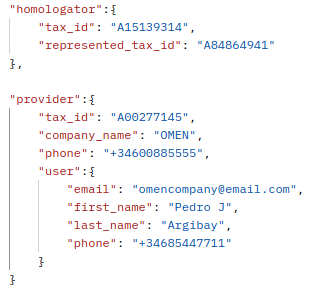
- homologator_tax_id: CIF of the homologator
- represented_tax_id: CIF of the company to obtain the files in S3 (not mandatory)
- provider_tax_id: CIF of the new company
- company_name: Name of the new company
- phone: Phone number of the new company
- email: Email of the new user
- first_name: First name of the new user
- last_name: Last name of the new user
- phone: Phone number of the new user (not mandatory)
Third step:
- Send request
If the request returns a 201, the creation was successful (For example):
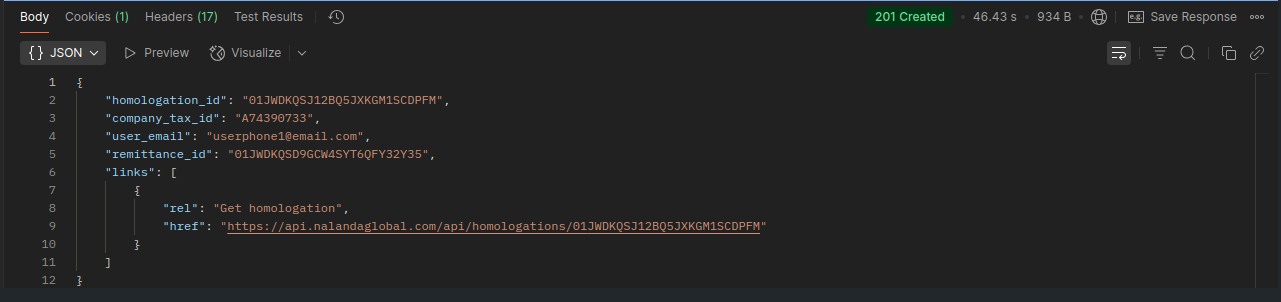
If there is any issue, the API will return an error code along with a message explaining the cause (For example):

Fourth step:
- Check the received emails and follow the instructions provided to start working with the homologation.